If you want to know how to mute someone on Instagram, the good news is that it takes only a few taps.
Muting hides an account’s posts and Stories from your feed without unfollowing them.
The other person never gets a notification, so there is no awkward moment.
This guide shows you exactly where to find the mute option, what it does and does not do, and how to undo it.
What Does It Mean to Mute Someone on Instagram?

Muting is a quiet way to clean up your feed.
When you mute an account, its content stops appearing in your main feed and in your Stories tray.
You are still following them, and they are still following you.
You can visit their profile any time and see everything they have posted.
You can also choose what to mute.
Instagram usually lets you mute posts, Stories, or both.
Muting is different from blocking, restricting, and unfollowing, which work in other ways.
Why Mute Instead of Unfollow?
Unfollowing can feel personal.
A friend, family member, coworker, or customer may notice when you unfollow them.
Muting solves the problem quietly.
Common reasons to mute an account include:
- Someone posts too often and fills your feed.
- A friend shares content that does not interest you.
- A brand or business you follow for work posts daily.
- A person is going through something you would rather not see right now.
- You want a break from an ex, a rival, or an old connection without making a statement.
How to Mute Someone on Instagram From Their Profile
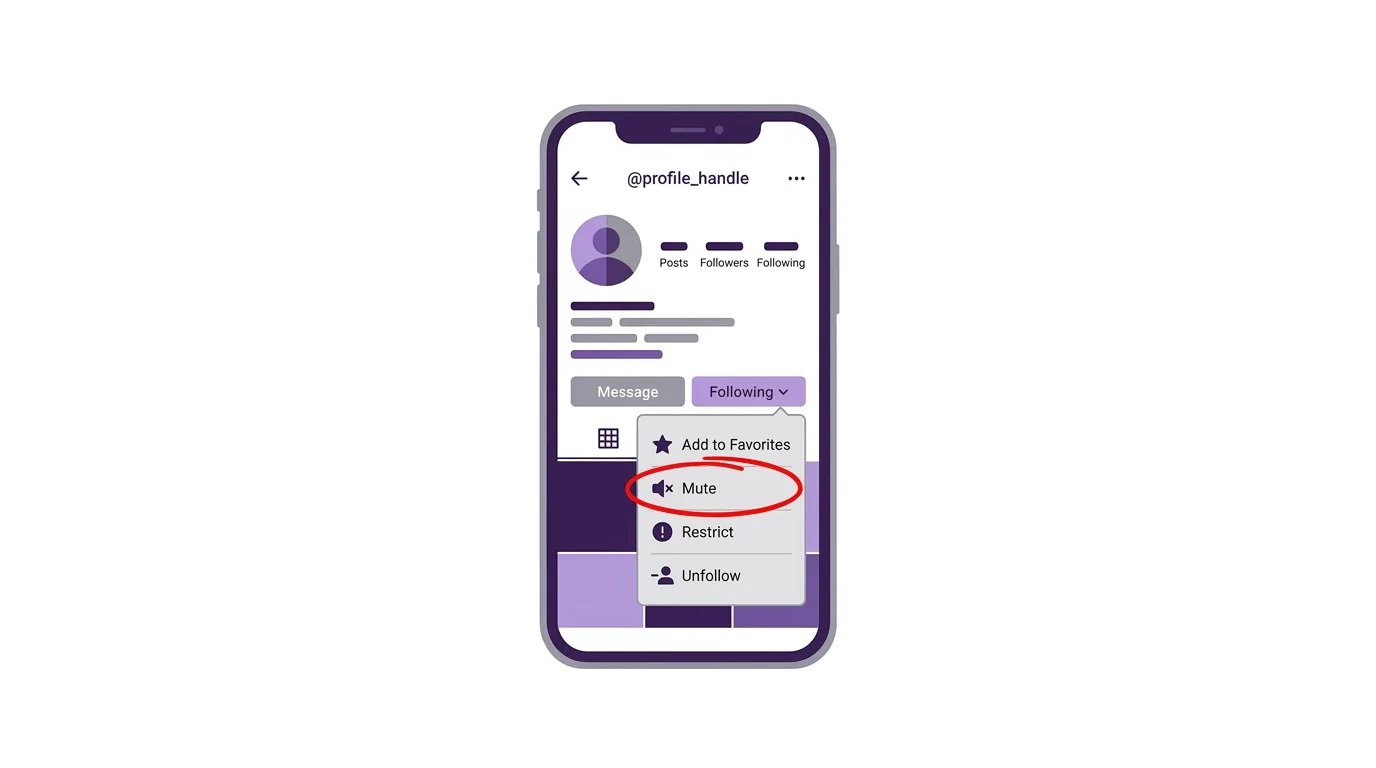
This is the most reliable method on iPhone and Android.
Menu names can change slightly between app versions, so look for the word Mute if your screen looks different.
- Open the Instagram app and go to the profile of the person you want to mute.
- Tap the Following button below their bio.
- Tap Mute.
- Turn on the switch next to Posts, Stories, or both.
- Close the window to save your choice.
The change applies straight away.
Their content will stop appearing in the places you chose.
How to Mute Someone From Your Feed
You do not have to leave your feed to mute an account.
- Find a post from the account in your feed.
- Tap the three-dot menu at the top right of the post.
- Tap Mute, then choose what you want to mute.
You can also press and hold a profile picture in your Stories tray and look for Mute.
This is handy when you notice an account is too noisy and want to act on the spot.
How to Mute Someone on Instagram Desktop
You can mute accounts on the website too.
- Go to instagram.com and log in.
- Open the profile of the person you want to mute.
- Click the Following button.
- Click Mute and choose Posts, Stories, or both.
The mute setting belongs to your account, so it also applies on your phone.
What Happens After You Mute Someone?
Muting is quiet and does not change your relationship on the platform.
The person is not told that you muted them.
They can still view your posts and Stories if your account allows it.
They can still like and comment on your content, and you will still receive those notifications.
You can still message them, and they can still message you.
If you want a direct message conversation to be quieter, you can mute notifications for that chat.
Open the conversation, tap the person’s name at the top, and look for Mute messages.
That setting is separate from muting their posts and Stories.
How to See Everyone You Have Muted
It is easy to forget who you muted.
Open Settings and activity from your profile menu, and search for Muted accounts.
You will see a list of everyone you muted, along with what you muted for each of them.
Menu locations change from time to time, so the search bar inside Settings is the fastest way to find it.
How to Unmute Someone on Instagram
Changed your mind?
Go back to the person’s profile and tap Following.
Tap Mute and switch off Posts, Stories, or both.
You can also open your Muted accounts list and unmute them from there.
Their content will return to your feed straight away.
New posts will appear normally, but older ones you missed will stay on their profile.
Mute vs Restrict vs Block vs Unfollow
These four tools are often confused.
Mute hides their content from you, but changes nothing for them.
Restrict limits what they can do on your content, such as hiding their comments from other people, and moves their messages to a separate inbox.
Block stops them from finding your profile, seeing your content, or contacting you.
Unfollow removes the connection, and they may notice.
Choose mute when you only want less of their content, and choose restrict or block when you want to limit their access to you.
Does Muting Hide Reels?
Instagram’s options can differ by version.
Mute settings usually cover feed posts and Stories.
Some content, such as Reels the account shares, may still appear through other parts of the app, such as the Reels tab.
If you want to see less of a certain kind of content, try the Not interested option on a post, which tells Instagram to show fewer similar items.
Tips for a Cleaner Instagram Feed
Muting works best as part of a simple routine.
Review the accounts you follow every few months, and mute or unfollow the ones that no longer fit your interests.
Use Favorites to see your closest friends first.
Use Following mode to see posts in time order, if you prefer less algorithm.
Mute noisy business accounts instead of unfollowing them, so you can still visit their profile when you need them.
Troubleshooting: Mute Not Working
If a muted account still appears, try these quick fixes:
- Check what you muted. You may have muted Stories but not posts, or the other way around.
- Update the app. An old version may use a different menu.
- Restart Instagram. Close the app fully, then reopen it.
- Look in other places. Reels, Explore, and suggested posts are not controlled by mute.
- Use Not interested. Tap the three-dot menu on a post to tell Instagram you want fewer similar posts.
Frequently Asked Questions
Can someone tell if I mute them on Instagram?
No.
Instagram does not send them a notification, and nothing changes on their side.
Does muting remove them from my followers or following list?
No.
You stay connected exactly as before.
Can I mute only Stories and not posts?
Yes.
You can choose posts, Stories, or both.
Will I still get their messages?
Yes.
Muting posts and Stories does not stop direct messages.
Can I mute someone I do not follow?
Muting is designed for accounts you follow.
If you do not follow someone, their posts usually do not appear in your main feed anyway.
Is muting the same as restricting?
No.
Muting hides their content from you, while restricting limits what they can do around you.
How do I mute someone temporarily?
Instagram does not clearly offer a built-in timer for muting accounts.
You can unmute them manually whenever you are ready.
Instagram Launches “Features”: Videos Up to 90 Minutes Long
Final Thoughts
Muting is one of the easiest ways to improve your Instagram feed without hurting anyone’s feelings. It hides posts and Stories quietly, keeps your connections intact, and can be reversed in a few seconds. Try it on the accounts that clutter your feed, and use restrict or block if you need stronger protection.
