
Deleting Telegram works a bit differently than most apps — there’s no traditional “deactivate” mode, and the account doesn’t disappear the moment you tap delete. Telegram gives you a built-in waiting period instead, which trips people up if no one explains it clearly.
This guide covers the full deletion process on Android and iPhone, what actually happens to your chats and groups, and what to do if you’ve lost access to your account.
How Telegram’s Deletion Actually Works
When you request deletion, Telegram doesn’t erase your account immediately. Instead, it sets a self-destruct timer, and your account is only fully deleted once that period passes without you logging back in.
| During the waiting period | After the timer ends | |
|---|---|---|
| Your account | Inactive, hidden from new interactions | Permanently deleted |
| Can you undo it? | Yes, just log back in | No, deletion is final |
| Chats & media | Preserved on your device | Erased from Telegram’s servers |
| Groups you admin | Still exist, ownership may transfer | Ownership passes to another admin |
| Channels you own | Still exist | May become ownerless or transfer, depending on setup |
If you’re not fully sure you want to leave permanently, this waiting period is your safety net.
Before You Delete: What to Check First
Groups and channels you manage. If you’re the sole admin of an active group or channel, consider promoting a trusted member to admin first, so it doesn’t become unmanaged after your account is gone.
Saved Messages and important chats. Telegram doesn’t offer a built-in account data export the way some other apps do, so manually save anything critical — forward key documents or media to another chat or device first.
Linked bots or automations. If you use Telegram bots for anything important (alerts, work tools, etc.), note that those connections break once your account is gone.
How to Delete Telegram on Android
- Open Telegram and tap the three-line menu in the top-left corner.
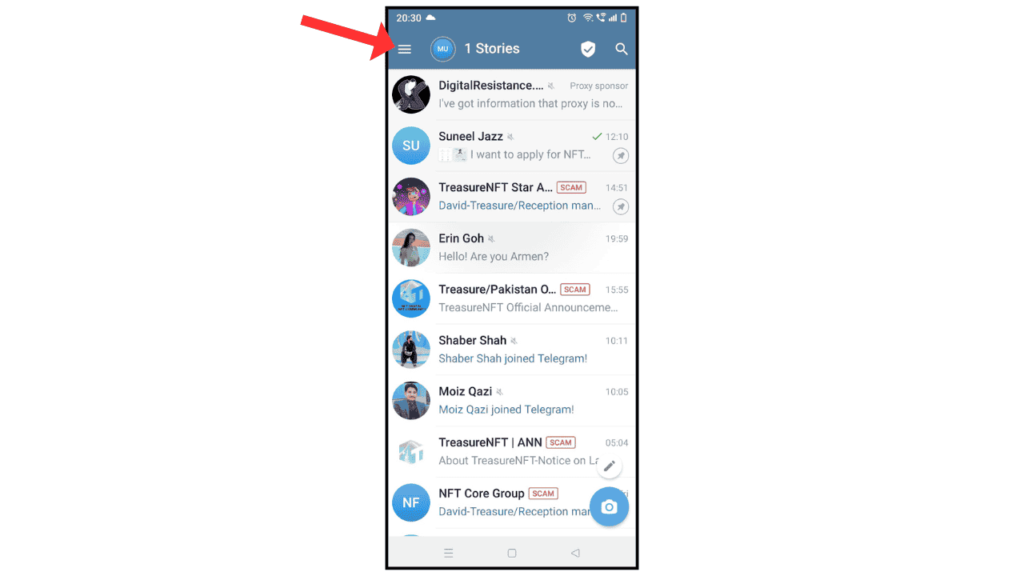
- Tap Settings.

- Tap Privacy and Security.

- Scroll to the bottom and tap Delete My Account.

- Choose how long of an inactivity period should trigger deletion (Telegram typically offers options like 1, 3, or 6 months).

- Confirm your phone number when prompted, then tap Delete My Account again to finalize the request.
How to Delete Telegram on iPhone
- Open Telegram and tap Settings in the bottom-right corner.
- Tap Privacy and Security.
- Scroll down and tap Delete My Account.
- Select your preferred inactivity period.
- Confirm your phone number, then tap Delete My Account to finalize.
What “Select a Time Period” Actually Means
This step confuses a lot of people. You’re not picking how long deletion takes — you’re picking how long Telegram will wait for inactivity before deleting the account automatically. Selecting “1 month,” for example, means your account will be permanently erased after one month of not logging in, not one month from right now regardless of activity.
If you log in at any point during that window, the countdown resets and your account stays active.
What If You’ve Lost Access to Your Account?
Since Telegram ties your account to a phone number, losing that number is the most common access issue.
Try logging in with the same phone number first, even if you no longer physically have that SIM — if the number hasn’t been reassigned yet, Telegram can send a login code to it.
If the number now belongs to someone else or is permanently lost, Telegram doesn’t offer a manual account recovery path in this case. The account will eventually become inactive and Telegram’s own automatic account deletion policy (accounts inactive for an extended period, typically around 6 months) will remove it without your intervention.
Frequently Asked Questions
Can I recover my Telegram account after it’s deleted?
No. Once the deletion period ends without a login, the account and its data are permanently gone.
Does deleting my account also delete group chats I created?
Group chats themselves generally persist for other members; ownership typically transfers to another admin if one exists, otherwise the group may become inactive.
Will my username become available for someone else?
Generally yes, once deletion is fully processed, though Telegram doesn’t guarantee an exact timeframe.
Do I need the same phone number to delete my account?
Yes, deletion requires verifying your phone number, since that’s how Telegram confirms account ownership.
What happens to messages I sent in chats with other people? Those messages typically remain visible to the other person, since deletion removes your account, not messages already delivered to others.
Also, how to use Telegram in Pakistan without VPN.
Final Thoughts
Telegram’s delayed deletion process is actually a helpful safety net if you’re not fully certain about leaving — just remember that logging back in during the waiting period cancels the deletion entirely. If you’re managing any groups or channels, hand those off before you go, since Telegram won’t do that for you automatically.
