
Deleting your Facebook account is more than just tapping one button. Facebook actually gives you two very different options, and picking the wrong one can mean losing photos, messages, or your Marketplace history you didn’t mean to lose.
This guide walks you through both options, what actually happens to your data, and the exact steps to delete your account for good.
Deactivate vs. Delete: Know the Difference First
Before you touch any settings, decide which one you actually want.
| Deactivate | Delete | |
|---|---|---|
| Your profile | Hidden, not visible to others | Permanently removed |
| Messages | Still exist for other people | Removed from your side |
| Can you undo it? | Yes, anytime by logging back in | Only within 30 days |
| Photos & posts | Saved, hidden | Permanently erased |
| Marketplace listings | Paused | Deleted |
Deactivating is a pause button. Nobody can see your profile, but everything is saved if you come back.
Deleting is permanent. After the 30-day grace period ends, your photos, posts, friend list, and Marketplace history are gone for good.
If you’re not fully sure, deactivate first. You can always come back and delete permanently later.
Before You Delete: Save What You’ll Miss
Once the 30 days are up, there’s no getting this back. Take five minutes now.
Download your data first. Go to Settings & Privacy, then Settings, then Your Information, then Download Your Information. Facebook will package your photos, messages, and posts into a file you can keep.
Check what’s linked to your account. Instagram, WhatsApp, and any apps you signed into “with Facebook” may lose access or log you out once your account is gone.
Save admin roles. If you manage a Facebook Page or Group, transfer ownership first, or it may become inaccessible.
How to Delete Your Facebook Account: Step-by-Step
Step 1: Log in to Facebook
Open Facebook and log in using your phone number or email address.

Step 2: Open your profile menu
Tap your profile icon in the top corner of the screen. This opens the dropdown menu with your account options.

Step 3: Go to Settings & Privacy
From the dropdown, select Settings & Privacy, then tap Settings. This takes you into Facebook’s main settings page.

Step 4: Open Account Center
Inside Settings, tap Account Center. This is where Facebook manages account-level actions, including deletion.

Step 5: Select Personal Details
In the Account Center, tap Personal Details.

Step 6: Tap Account Ownership and Control
Select Account Ownership and Control to view options for deactivating or deleting your account.
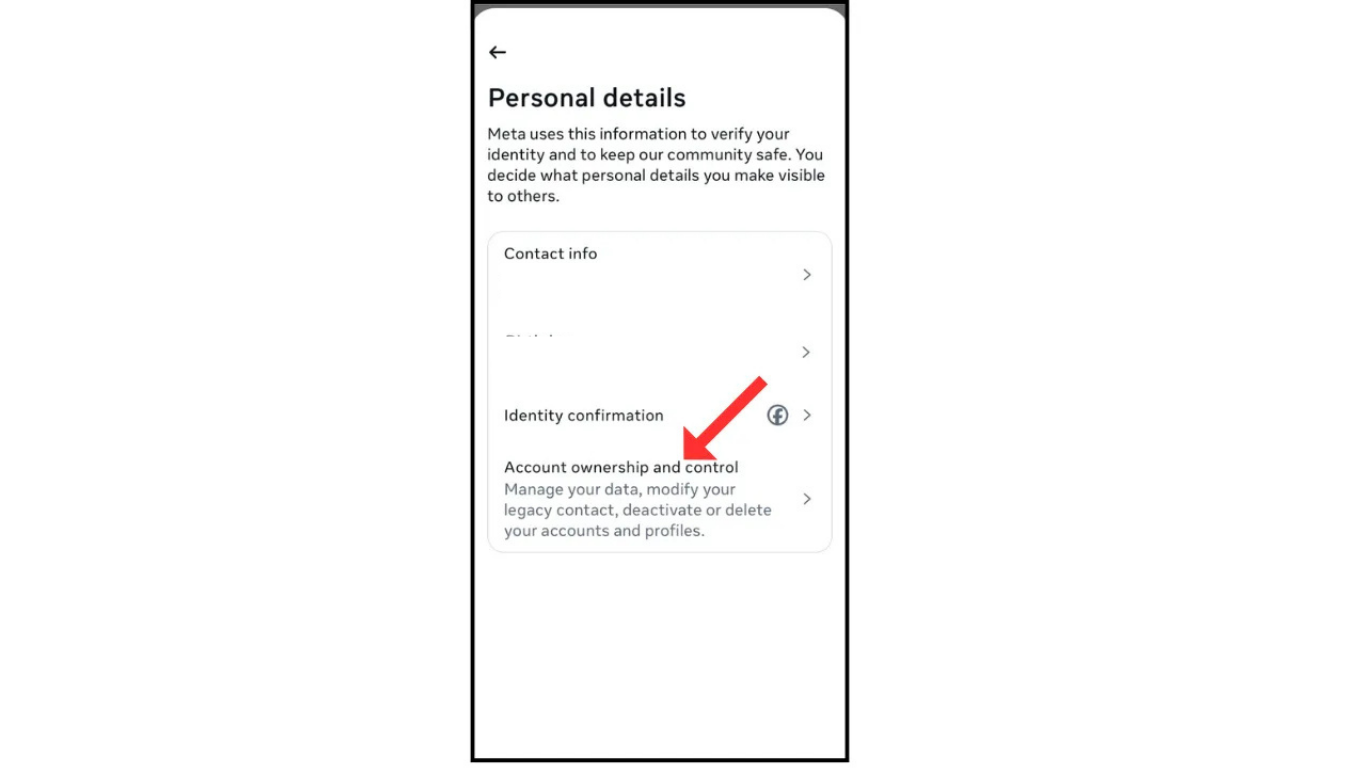
Step 7: Choose Deactivation or Deletion
Tap Deactivation or Deletion, then select the account you want to remove if you manage more than one.

Step 8: Confirm permanent deletion
Select Delete Account, tap Continue, then enter your password to confirm. Facebook will now begin the 30-day countdown before permanent deletion.

Facebook will confirm your request and start the 30-day countdown.
What Happens During the 30-Day Waiting Period
Your account goes into a locked state. It’s invisible to other users right away, but it isn’t actually erased yet.
Changed your mind?
Simply log back in before the 30 days are up, and Facebook cancels the deletion automatically. Everything comes back exactly as it was.
Didn’t log in?
Once the 30 days pass, deletion is final. Facebook begins permanently removing your data from its servers, which can take up to 90 additional days to fully clear from backups.
Frequently Asked Questions
Can I recover my account after it’s fully deleted?
No. Once the 30-day window closes and Facebook confirms deletion, there is no way to recover your profile, photos, or messages.
Does deleting Facebook also delete Messenger?
Yes, if you use Messenger through your Facebook login. If you created a separate Messenger-only account, that stays active unless you delete it separately.
Will my friends still see old messages I sent them?
Yes. Messages you sent remain visible in your friends’ inboxes even after your account is deleted; only your access to them is removed.
How long does the entire deletion process take?
The visible deletion takes 30 days, but Facebook states backend data can take up to 90 more days to clear completely from their systems.
What happens to photos I was tagged in by other people?
Those stay on Facebook since they belong to the other person’s account, but your name tag is removed.
Final Thoughts
Deleting Facebook is permanent, so it pays to slow down for five minutes: download your data, hand off any Pages you manage, and double check linked apps before you confirm. Once you’re ready, the steps above take less than two minutes to complete.
